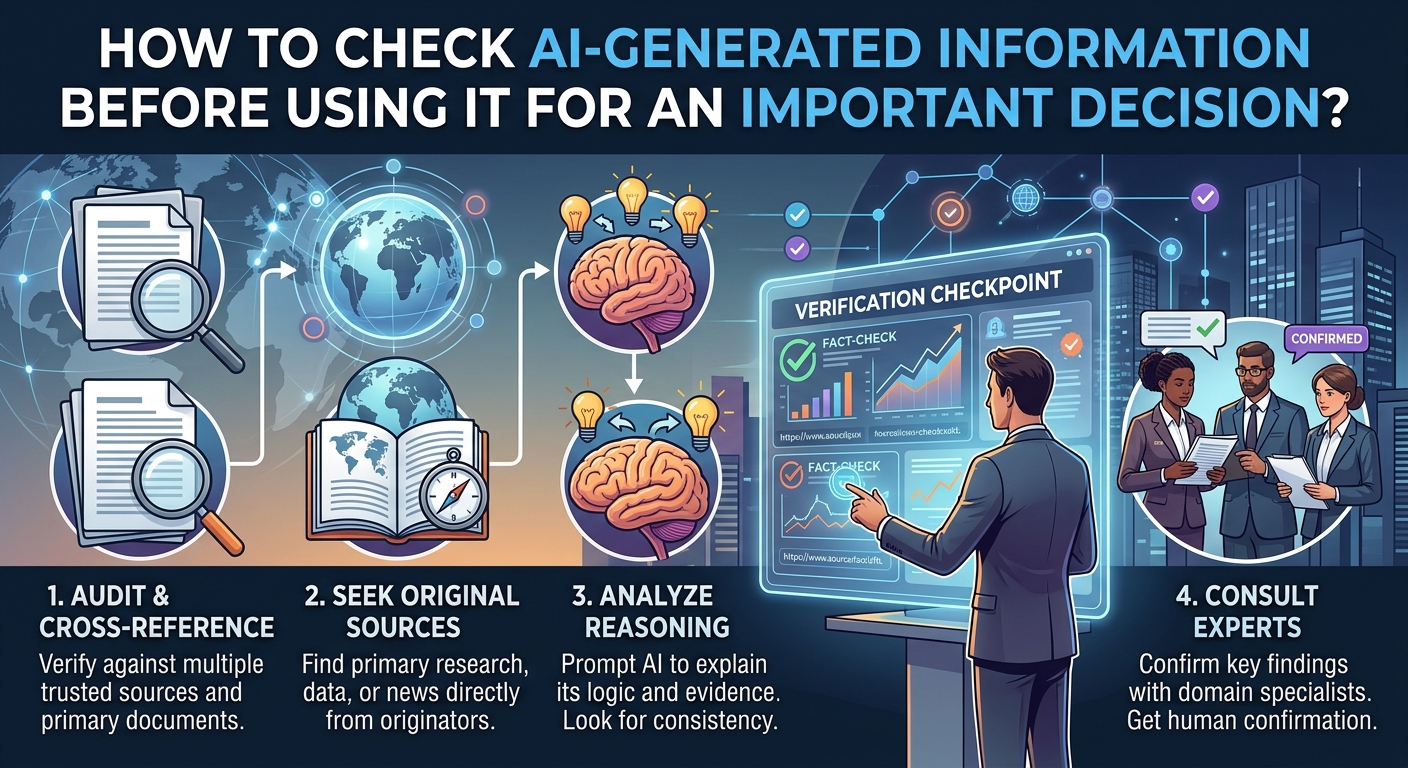
AI can produce an answer in seconds that looks polished, detailed, and completely certain.
That is exactly why verification matters.
A chatbot can give you a useful starting point and still get an important fact wrong. It can misunderstand your question, use outdated information, invent a citation, confuse two similar subjects, or present an uncertain conclusion with confident wording.
NIST describes this problem as “confabulation”: generative AI can produce false or erroneous information and present it confidently. NIST specifically notes that these errors can become especially important when AI outputs are used in consequential decisions.
Google gives similar guidance for Gemini, telling users to think critically and check information presented as fact. OpenAI also advises users to verify important information, including data, technical information, quotes, and references.
The practical lesson is simple:
Do not ask only whether an AI answer sounds reasonable. Ask how you can independently prove that the important parts are correct.
First, Decide How Important the Information Really Is
Not every AI answer requires the same level of checking.
If you ask an AI tool for five ideas for organizing your desktop, a small mistake may not matter much.
If you ask whether a contract allows something, whether a financial product is suitable, whether a technical command could delete files, or whether a medical symptom requires attention, the consequences are much greater.
Start by asking:
What happens if this answer is wrong?
If the answer is “not much,” a quick sanity check may be sufficient.
If the answer involves money, health, legal rights, employment, security, privacy, personal safety, or irreversible data loss, use a much stronger verification process and consult an appropriate professional where necessary.
NIST’s AI Risk Management Framework emphasizes managing AI risks according to the context and potential impact of the use case rather than treating every AI application as equally risky.
Separate the AI Answer Into Individual Claims
One of the easiest mistakes is trying to verify an entire AI response at once.
Instead, break it into claims.
Imagine an AI response says:
“This phone supports feature X, the feature was added in version Y, and enabling it will improve battery life.”
That is not one claim.
It is at least three:
- Does the phone support feature X?
- Was it introduced in version Y?
- Does enabling it actually improve battery life?
Each statement could have a different source.
The first might be answered by the manufacturer’s specifications.
The second might require official release notes.
The third might require testing or independent technical evidence.
Breaking the response apart makes verification much easier.
Look for the Original Source
If an AI answer makes an important factual claim, find the source behind it.
Do not treat an AI-generated citation as proof by itself.
AI systems can sometimes generate citations or references that look convincing but do not support the statement—or do not exist at all. OpenAI specifically warns that AI can produce fabricated citations, references, studies, and quotes.
Instead, open the source.
Then ask:
Does this source actually say what the AI claims it says?
This is particularly important when the AI gives you:
- a study
- a statistic
- a quotation
- a law or regulation
- a product specification
- a government rule
- a technical recommendation
- a date
- a historical claim
- a medical statement
A source name alone is not verification.
Prefer Primary Sources
The quality of your verification depends heavily on where you check.
For a product feature, start with the manufacturer’s documentation.
For an operating-system feature, check the operating-system provider.
For a government rule, look for the relevant government or regulatory authority.
For research, look for the original paper or a reputable research database.
For security guidance, prioritize recognized security organizations and official vendor documentation.
For example, Google’s own Gemini documentation explicitly says users should check AI-provided factual information using Google and other resources.
The same principle applies regardless of which AI system produced the answer.
Check the Date
An AI response can be factually correct for an older version of a product or service and still be wrong for the situation you face today.
This is especially common with:
- software features
- subscription pricing
- product specifications
- operating-system settings
- laws and regulations
- security recommendations
- company policies
- AI capabilities
- online services
When checking an important claim, look for a publication date, update date, version number, or effective date.
Then ask:
Is this information current for the version or situation I am dealing with?
A five-year-old article can be accurate about what a service used to do and completely unhelpful for what it does now.
Verify the Exact Product, Version, or Model
“Does this work on Android?” is often too broad a question.
Android phones from different manufacturers can have different features.
The same is true for:
- iPhones
- Windows PCs
- Macs
- browsers
- cloud services
- software applications
- routers
- smart-home devices
If an AI response tells you to select a particular setting, confirm the exact device and software version.
For example:
Phone: manufacturer and model
Operating system: version
Application: name and version
Computer: operating system and version
Without those details, an answer can sound correct while describing a menu that does not exist on your device.
Don’t Treat Confident Language as Evidence
AI is particularly persuasive because its answers are usually written in a natural conversational style.
A statement such as:
“The reason this happens is…”
can sound much more certain than:
“One possibility is…”
But the wording does not establish accuracy.
NIST specifically describes generative-AI confabulations as erroneous content that can be presented confidently.
That means confidence should never be one of your verification criteria.
Instead, look for:
- evidence
- source quality
- dates
- documentation
- independent confirmation
- clear uncertainty where appropriate
A confident answer without evidence remains an unverified answer.
Ask the AI to Identify Its Sources, But Still Check Them
Asking an AI tool:
“What sources support this?”
can be useful.
It can help you identify what information needs further checking.
But don’t stop there.
Ask:
“Which source supports this specific claim?”
Then open the source yourself.
This turns the AI from a final authority into a research assistant.
That’s a much safer role.
OpenAI itself recommends treating ChatGPT as a starting point and checking important information against reliable sources.
Cross-Check Important Facts With an Independent Source
One source can contain an error.
For an important decision, look for independent confirmation.
Suppose an AI tells you that a particular phone supports a security feature.
You could check:
- The manufacturer’s specifications.
- The official support documentation.
- Documentation for the operating system or feature itself.
If all three agree, your confidence is much stronger.
The sources should ideally be genuinely independent.
Copying the same claim from three websites that all copied the same original article does not provide three independent confirmations.
Be Careful When the AI Provides a “Perfect” Explanation
A detailed explanation can actually make verification more important.
AI systems are very good at producing plausible explanations.
NIST notes that generative AI can produce not only false facts but also misleading reasoning or citations that appear to justify an incorrect answer.
So don’t assume:
“It explained the reasoning clearly, therefore the reasoning must be correct.”
Instead, verify the underlying facts.
A beautifully written explanation can still be based on a false premise.
Test Technical Instructions in a Safe Environment
Technology decisions often involve instructions rather than simple facts.
For example, an AI might suggest:
- changing a system setting
- running a command
- modifying a configuration file
- deleting cached data
- changing permissions
- removing an application
- changing a security setting
Before doing this on your main device, determine what the command or action actually changes.
If the action could cause data loss or affect security, don’t execute it simply because the AI says it is safe.
Look for official documentation.
Where practical, test a reversible change first.
And if a command could permanently delete or overwrite information, make sure you have a verified backup before proceeding.
Ask the AI to Explain What It Is Uncertain About
This can improve the quality of your verification process.
Instead of asking:
“Is this definitely correct?”
ask:
“Which parts of your answer are uncertain or depend on the device version?”
Or:
“Which claims should I independently verify before acting on this?”
The AI’s response is still not proof.
But it can help you identify which parts deserve additional attention.
You can also ask:
“What assumptions are you making?”
This is particularly useful when the original question did not include enough information.
Watch for Hidden Assumptions
An AI may answer a question using assumptions you never intended.
Consider:
“Should I delete these files?”
The correct answer depends on what the files are, whether they are backed up, whether another application needs them, and whether they can be recovered.
If those facts are missing, an AI may fill in the gaps.
Before acting, ask:
“What information would change your answer?”
This is a powerful verification question.
It turns a vague recommendation into a list of conditions you can check yourself.
Check Whether the Information Is an Opinion or a Fact
AI responses can mix facts, interpretations, recommendations, and opinions without making the distinction obvious.
For example:
Fact: A software feature exists.
Interpretation: The feature is useful for a particular type of user.
Recommendation: You should enable it.
Those are three different statements.
The first can often be verified through documentation.
The second may require comparison or expert analysis.
The third depends on your own situation.
Don’t let an AI’s fluent writing turn a recommendation into something that looks like an established fact.
Be Extra Careful With Numbers
Numbers deserve special attention.
AI-generated responses may contain:
- percentages
- prices
- dates
- limits
- storage capacities
- battery figures
- performance measurements
- statistics
- rankings
- study results
Ask where the number came from.
Then verify the date and methodology when appropriate.
A statistic without context can be misleading even when the number itself is genuine.
For example, a battery-life figure might come from a manufacturer’s controlled test rather than ordinary use.
A price might exclude taxes or apply only to a particular region.
A study might involve a small or highly specific population.
The number alone is not the complete information.
Be Especially Careful With Medical, Legal, and Financial Decisions
These areas require a higher standard.
Google’s current Gemini guidance explicitly says users should not rely on Gemini responses as medical, legal, financial, or other professional advice.
That does not mean AI is useless in these areas.
It can help explain terminology, organize questions, summarize documents you provide, or help you prepare for a conversation with a qualified professional.
But the AI response should not become the final authority when the consequences of being wrong are serious.
For a medical decision, consult an appropriate healthcare professional.
For a legal matter, consult an appropriately qualified legal professional.
For an important financial decision, consider qualified financial or tax advice appropriate to your circumstances.
The higher the potential harm, the less appropriate it is to rely on an unverified AI response alone.
Check for Missing Context
An AI answer may be correct under one set of circumstances and wrong under another.
For example, a technology recommendation might depend on:
- country
- device model
- operating-system version
- account type
- subscription level
- business versus personal use
- age of the software
- available storage
- network configuration
Before accepting an answer, ask:
“What conditions does this answer depend on?”
Then check whether those conditions match your situation.
Don’t Use AI to Verify AI
Asking another chatbot whether the first chatbot is correct can provide another perspective, but it is not independent verification by itself.
You could end up with:
AI A → claim → AI B → agrees
without either system being connected to reliable evidence.
Multiple AI systems agreeing does not prove that the underlying fact is true.
For important decisions, move outside the AI conversation.
Check documentation, original sources, records, measurements, or qualified human expertise.
Use AI to Help You Build a Verification Checklist
This is one of the better uses of AI.
Instead of asking:
“Tell me what I should do.”
try:
“What facts should I verify before making this decision?”
For example, if you are deciding whether to replace a computer, AI could help you create a checklist covering:
- current hardware
- required software
- compatibility
- storage
- warranty
- repairability
- actual workload
- total cost
You can then verify those facts independently.
This changes AI’s role from decision maker to decision-support tool.
That is often much safer.
Keep the Original Question and Answer
If the decision matters, save the AI conversation or record the relevant claims.
Why?
Because you may later discover that an important assumption was missing.
Keeping the original response allows you to compare:
What the AI actually said
with
What you later discovered.
This can also make it easier to identify recurring problems with a particular type of AI-generated information.
Do not, however, treat a saved AI conversation as documentation or evidence simply because you kept it.
It is a record of what the AI said, not proof that the statement was true.
Use a Simple Verification Ladder
For everyday decisions, a four-level process can work well.
Level 1: Sanity Check
Ask whether the answer seems plausible and whether anything immediately looks wrong.
This is suitable for low-consequence information.
Level 2: Source Check
Find the original or authoritative source supporting the important claim.
Check the date and context.
Level 3: Independent Cross-Check
Confirm the important fact using another trustworthy source.
This is appropriate when the decision has meaningful consequences.
Level 4: Human or Professional Review
For high-stakes decisions, consult an appropriately qualified person.
Do not let an AI response substitute for professional judgment simply because it is detailed or confidently written.
A Practical Example
Imagine an AI tells you:
“You can safely delete this folder because it only contains temporary files.”
Don’t immediately delete it.
Break the statement into questions:
What is the folder?
Check the official documentation.
Is it actually temporary?
Look at its location and purpose.
Does the application recreate it?
Check the software documentation.
Could deleting it remove useful information?
Search the official support material.
Is there any risk of data loss?
Make sure important data is backed up first.
Only then decide whether the action is appropriate.
Notice what happened.
The AI didn’t disappear from the process.
It simply stopped being the final authority.
Red Flags That Should Trigger Extra Verification
Slow down when an AI answer:
- gives an exact statistic without a source
- cites a study you cannot find
- provides a quotation without a reliable reference
- makes a legal or medical conclusion sound certain
- gives a current price without a date
- claims a feature exists without identifying a version
- recommends deleting files
- asks you to disable security protections
- provides a command that could modify or delete data
- contradicts official documentation
- answers an ambiguous question without acknowledging the ambiguity
- claims something is “guaranteed”
- says a result is “100% safe”
- gives highly specific information that seems impossible to verify
One red flag does not automatically mean the answer is wrong.
It means the answer deserves more checking.
A Quick AI Verification Checklist
Before using AI-generated information for an important decision, ask:
- What exactly is the AI claiming?
- Which claims actually matter to my decision?
- What could happen if one of them is wrong?
- Is the information current?
- Does it apply to my exact device, version, location, or situation?
- Can I find an authoritative source?
- Does the source actually support the claim?
- Can I confirm the important fact independently?
- Did the AI make assumptions that I need to check?
- Is the response presenting an opinion as a fact?
- Does the decision involve health, law, money, safety, privacy, or irreversible data loss?
- If so, have I obtained appropriate professional or authoritative guidance?
- Have I avoided taking an irreversible action until verification is complete?
If several answers are “no,” don’t use the AI response as the basis for the decision yet.
What AI Is Good at During Verification
Verification does not mean avoiding AI altogether.
AI can be useful for:
- turning a complicated question into smaller questions
- explaining unfamiliar terminology
- identifying information you should look up
- creating comparison criteria
- summarizing documentation you provide
- generating questions to ask a professional
- identifying assumptions in a proposed plan
- helping organize evidence
The important distinction is between using AI to help investigate a decision and using AI as the evidence that settles the decision.
The first can be useful.
The second can be risky.
What AI Should Not Replace
AI should not replace the original source when an authoritative source is available.
It should not replace professional judgment when the issue requires professional expertise.
It should not replace your own verification when the action could cause irreversible harm.
And it should not replace common sense.
If an AI answer tells you something that conflicts with the official documentation for the product you own, stop and investigate the disagreement.
Don’t choose the AI answer simply because it explains the situation more clearly.
Final Takeaway
The safest way to use AI for an important decision is to treat its answer as a starting point, not proof.
Break the response into individual claims. Identify the claims that actually affect your decision. Check authoritative sources. Verify dates and versions. Look for hidden assumptions. Cross-check important facts independently. And when the consequences are serious, involve an appropriately qualified human professional.
The goal isn’t to distrust every AI response.
It’s to put the right amount of verification between an AI-generated statement and a real-world action.
Use AI to help you think, research, organize, and question. Verify the facts before you act.
Sources and Further Reading
- NIST — Artificial Intelligence Risk Management Framework
- NIST — Generative Artificial Intelligence Profile
- NIST — Generative AI Profile PDF
- OpenAI — Does ChatGPT tell the truth?
- Google — Learn about generative AI
- Google — Learn about responses from Gemini Apps
- NIST AI Resource Center
FAQs
Can AI-generated information be trusted?
AI can provide useful and accurate information, but it can also produce incorrect or misleading answers. OpenAI, Google, and NIST all document this limitation. NIST refers to confidently presented false AI output as “confabulation.”
Should I ask another AI to verify the first AI’s answer?
It can provide another perspective, but agreement between two AI systems is not independent proof. For important information, verify the claim against authoritative documentation, original research, official records, or qualified human expertise.
How can I tell if an AI citation is real?
Open the cited source yourself. Check that the source exists, that it actually contains the claimed information, and that the date and context apply to your situation. AI systems can generate citations or references that are inaccurate or fabricated.
What information should I verify most carefully?
Prioritize information that could affect money, health, legal rights, security, privacy, employment, personal safety, or irreversible actions. Also verify exact technical instructions that could delete data or change important system settings.
Is AI useful for making important decisions at all?
Yes, when used as decision support rather than unquestioned authority. AI can help organize information, identify questions, explain terminology, compare criteria, and suggest what you should investigate. The important facts should still be independently verified.
What is the simplest rule to remember?
The more serious the consequence of being wrong, the stronger your verification should be. A minor recommendation may need a quick check. A decision involving money, health, legal matters, security, or irreversible data loss deserves authoritative sources and, where appropriate, professional advice.